Thursday, January 25, 2018

The Banner Saga Analysis

The Banner Saga Analysis

The Banner Saga Analysis

David Hunter

January 22, 2018

1 Overview

The Banner Saga is a top-down isometric turn-based tactical RPG developed by Stoic and published in January 2014 by Versus Evil.

2 Formal Elements

2.1 Players

The Banner Saga is a strictly single player experience. The player alternatively takes control of two different groups: a group in the west led by Vognir and a group in the east led by Rook. Travel between locations is entirely scripted, but travel will stop periodically with conversation prompts, allowing the player to drastically alter the course of events.

2.2 Objectives

As the player progresses through the game, the main actions they take will be making dialogue choices and engaging in turn-based tactical combat. The objective is to finish the game in an optimal state by making dialogue choices which increase the viability of one’s caravan, and by engaging (or not) in combat in a such a way as to do maximum damage to enemies and receive minimum from them.

2.3 Rules

2.3.1 Combat
In combat, the player controls both humans and varl, a race of giants with horns. Combat takes place on a square grid, with human allies and enemies taking up one square, and varl and other large enemies taking up four squares (the character is centered). Like other turn-based tactical games, the turns alternate between player-controlled characters and AI-controlled characters. Once only one character is left on either side, a mode called ”Pillage” begins, in which characters simply move in order of initiative.
Clicking on a character will show their movement range, combat abilities, special abilities, and the ability to skip the character’s turn. Movement occurs only at right angles, although some special characters have diagonal attacks or abilities.
Once a character has moved and/or attacked, the turn ends and the next character will act.
2.3.2 Gear
Later on in the game, the player may acquire gear. This is mostly purchased from a merchant, but each character only has one equipment slot, and the different types of items are also extremely limited.
2.3.3 NPC Interactions
There are a great many of NPC interactions spread throughout the game. These can have far-reaching and diverse consequences. You might decide to attack a group of bandits or dredge, which could give you more Renown or cost you resting time to allow your heroes to recover from wounds, or you might decide to run away. Someone in your caravan might get drunk and assault another member, and you will have to decide how to deal with it, or when you encounter a group of fellow travelers, will you allow them to join your group, run them off, kill them, or what? These could affect the number of members of your caravan, your amount of food, who is available for battle, and even which party members live and die.
2.3.4 Stats and Leveling
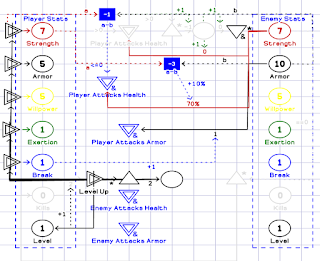
Each enemy the player kills grants the player with Renown. This functions both as money and as XP, similarly to souls from the Souls series. Each character will be able to level up after getting a certain number of kills. The player levels up characters by spending increasing amounts of renown. Each time a character levels up, two points are granted to spend increasing that character’s stats.
Each character has the same six stats: Ability, Armor, Strength, Willpower, Exertion, and Break, but each has a different starting value and maximum value, in addition to one different active ability and passive ability.

2.4 Procedures

2.4.1 Resolve Conflict or Talk to NPC
The player will spend a large amount of time resolving conflicts or talking to NPCs. These dialogues could be purely for flavor, to add depth or realism to the characters and the world they inhabit, or they could be mechanically driven, to create diverging plot lines, or affect the player’s resources in some way. For instance, following a battle in a city, the player might be faced with the choice of recruiting some of the defeated enemies into their caravan, slaughtering them, or leaving them to their fate. Each choice has a knock on effect to later parts of the game experience. Slaughtering them will deprive the player of those fighters later on, when their support might be critical. Allowing them to join might spawn a whole host of conflicts inside one’s caravan as the two groups struggle to coexist. The player will, of course, have to deal with those as they arise.
2.4.2 Engage in Combat
The other major use of time in The Banner Saga is combat. Although many conflicts can be resolved through dialogue choices, combat at many points is inevitable. The player has the chance to decide which members will engage in combat, and the order of their turns. Once in the combat screen, the player has a few options for placing their party members before the blood starts flying. As combat progresses, the player must gauge what the enemy AI is likely to do, what their best response would be to negate that or to mitigate any unavoidable damage. Archers and mages need to be placed in a sweet spot: close enough to unleash their abilities, but far away enough stay out of harm’s way.
2.4.3 Leveling Up
Leveling up a character grants the player two points to spend increasing their stats. However, Renown must be spent to increase a character’s level, which might be better used purchasing supplies, or convincing someone to do you a favor.
2.4.4 Managing Health Conditions
If characters fall in battle, they are not killed (except in some extremely limited circumstances). Instead, they enter a wounded state and must rest in a camp for a certain number of days to heal. Being wounded brings with it deficits to a characters Strength and other stats, which may make the character more of a liability than an asset on the battle field.

2.5 Resources

2.5.1 Tangible Resources
  1. Party members: Party members hold many of the intangible resources listed below, but qualify as tangible resources since they may change location in the game world.
  2. Items: Items may be purchased from vendors, and stored in inventory or equipped on party members. These have level requirements and modify character stats.
2.5.2 Intangible Resources
  1. Strength: Strength functions as both health and damage in combat. When a character’s strength drops to zero in combat, the character is removed from combat and will enter an injured state when combat is finished.
  2. Armor: Armor blocks damage, so to figure out how much damage you will do to an enemy, simply subtract their armor from your strength. If the enemy has more armor than the character has strength, the damage is set to a minimum of 1 and the chance to hit the enemy is reduced 10% for each point of difference between your strength and their armor.
  3. Willpower: Willpower determines how many total extra action points the player will have during combat to increase movement range or boost the damage of an attack.
  4. Exertion: Exertion determines the number of Willpower points the player may spend at any given time. Increasing this stat allows the player to use more Willpower per action, but of course also uses up Willpower quicker.
  5. Break: Break is the amount of natural damage to armor. When the player chooses to attack armor, this determines how much the enemy’s armor will be reduced.
  6. Supplies: Supplies refer to food or water to feed the members of your caravan. The more clansmen, fighters, and varl you have, the more quickly your supplies will be drained.
  7. Renown: Renown is received by killing enemies in combat, completing NPC interactions with particular choices. As mentioned before, it is used both as currency to purchase items and supplies from markets, and as XP to level up characters.
  8. Morale: Morale determines the amount of willpower you have available for your characters in battle. It is itself determined by previous wins and losses, days spent resting, in a village, or out of a village, and certain dialogue choices and game events.

2.6 Conflicts

The overarching conflict in The Banner Saga is between the player’s caravan members, who are struggling for survival, and the bandits and Dredge who seek to kill them. Sometimes the bandits may become party members later on, but the inhuman Dredge, who are encased in thick black armor which must be whittled away before they can be killed, remain a constant threat throughout the game.
2.6.1 NPCs
As in life, NPCs do not always say what they mean and even if they do, what they want might directly conflict with the player’s goals.
2.6.2 Strength versus Armor
Both in terms of which the player decides to increase when leveling up, and in terms of which to attack during combat, strength and armor represent a constant trade-off. Increasing armor might mitigate damage, but it also limits one’s own ability to do damage, while increasing strength increases both damage and health, it does little to prevent the character from being knocked out during battle.

2.7 Boundaries

Due to its limited scope, The Banner Saga features a large number of boundaries.
The number of NPCs that it is possible to interact with is severely limited and controlled. The player might be able to interact with at most three NPCs at the same time. These are mostly static images of characters with light animations during the dialogue; outside of dialogue interactable characters are buttons with a portrait.
In towns, similarly, there are at most three locations to interact with at any given time. Towns are not explorable, but are instead mostly static backdrops with two or three interactable buttons disguised as buildings scattered throughout them.
The world map features a large number of locations which the player may click on to gain more information about them and their history and lore, but outside of a few dialogue choices, the player cannot influence where their party will progress to next.
There are no money or loot rewards from battle, and similarly no upgrading your character’s equipment and selling the old stuff.
2.7.1 Leveling
Characters may increase their level to 5, after which it makes more sense to have lower level characters deliver the killing blow.

2.8 Outcomes

At the end of the game, there are two basic outcomes, but the player’s caravan may be in several different states, depending on how long the player has spent traveling, how well they have managed supplies, which NPCs they have helped and how, etc. Losing a battle does not mean the game is over in most cases. The player may lose some morale and have characters become injured, but usually the game continues and the player must deal with the new negative circumstances.

3 Dynamic Elements

Due to the boundaries mentioned earlier, The Banner Saga seems to feature limited dynamic elements. There is no day/night cycle, no stealth, no crafting, there are no political factions to align oneself with or to oppose. There are no buildings to construct which lock or unlock unit development or research branches.
With that said, there are dynamic elements in terms of combat affecting the caravan’s morale and the caravan’s morale affecting combat. If the player wins in combat and avoids injuries, the caravan’s morale generally increases, which gives the characters a boost in willpower for the next combat. If the player loses, this reduces caravan morale and may decrease the character’s willpower in the next combat. The player’s performance in combat will also determine the amount of injuries the characters sustain, which in turn will affect the number of rest days needed to heal them, which will affect food and morale (the later could be positive or negative, depending on where the player rests).
There are further dynamic elements which are harder to quantify directly. The player’s dialogue choices definitely affect the morale, amount of supplies, number of warriors available to fight, and number of clansmen to feed. The problem is that it is not exactly clear how these decisions affect them. The game shows you that after a decision your morale has improved or worsened, but it is not clear why this is the case, so the player cannot understand how to make better decisions in the future.

3.1 Patterns

This section focuses on game patterns as discussed by Ernest Adams and Joris Dormans in Game Mechanics: Advanced Game Design.
3.1.1 Dynamic Friction
The main quantifiable pattern is dynamic friction in the case of the increasing number of kill and amount of Renown needed to level up a character.

4 Dramatic Elements

The dramatic elements are probably some of the strongest parts of The Banner Saga.

4.1 Characters

There are a few dozen characters in The Banner Saga, and most are well-developed. Many of them have a story arc over the course of the game, during which they change and grow. There are Ubin, Hakon, and Iver, immortal varl who have seen it all, Rook and his daughter Alette, who he tries to protect, Ludin, the prince to the kingdom of men, who nobody really likes, and others.

4.2 Story

The story follows two caravans, led by Hakon and Rook, respectively, along their journeys. They are both fleeing from Dredge, and the player must guide them to their destinations. The player must decide how to do this, either by trying to help as many fellow travelers as possible, leaving behind the old, sick and weak, being vicious to outsiders while protecting one’s own, or by sacrificing one’s caravan for the good of one’s fighters.
Eventually, Hakon’s group finds a mage named Eyvind, whose companion, Juno, is at first believed to be dead. Hakon’s group and Rook’s group meet in a city called Boersgard. There, Juno joins them and they find a way to defeat the leader of the massive army of Dredge that threaten the lives of all.

4.3 Attitude

The story contains some humorous elements but these are bleak and bitter. The tale told is one of hardship endured, for no reward except to survive another day.

5 Conclusion

The Banner Saga is a low-budget title which features interesting story-telling mechanics and a few innovations on the tried-and-true turn-based combat from isometric RPGs of yore. By forcing the player to make decisions and live with the uncertain consequences, it creates the sensation of being a new leader, responsible for the lives of those following you. Although limited in scope, it uses these decisions to make the player care about the caravans struggling to get by in a disinterested and sometimes openly hostile world.

Sunday, January 14, 2018

Particularly Wavy Rotation Update

Happy New Year!

Although one could certainly dispute the "happy" part, let's just take that as hopes that 2018 will be happy and leave it at that.

Before I left on vacation to Spain, which was wonderful BTW, I had noticed that my new rotation schemes were not entirely working. Which is to say that they were basically garbage and were broken. Well, after a dozen hours working on them, I can now say with some confidence that rotation works in Particularly Wavy. You can grab a rotatable object anywhere on its surface, and you will be able to drag and rotate it within its rotation range using the mouse. It is smooth and works fine. It does not matter where you grab the object, what its initial rotation is, or what the rotation range is: it just works.

For the rest of the week, the plan is to continue to design levels using prisms, as I have about 7 more levels which should utilize them. Following prisms, I have about 10 levels planned for filters and 20 levels for light splitters.

To support development, please check out my Patreon page and contribute.

Thursday, December 28, 2017

Particularly Wavy Update

hey all,

I have not gotten nearly as much work done as I wanted to this week. I've had more or less full-time work hours at my (kind of) paying job, which has greatly reduced the hours I can put into the game.

But what I have got done is this: I now have 41 puzzles complete and playable. The first 30 deal with reflection, while the next 20 (once completed) will deal with refraction. In that vein, I have removed a vicious set of bugs due to some recursive functions that I was using to deal with interior reflection inside a prism. These bugs at first caused Unity's garbage collector system to go haywire, with lots of errors spamming the console about "78 bytes allocated at " some random location, and after getting those to stop, I ran into a bug that caused Unity to simply crash. So, I was forced to greatly simplify the calculation of these internal reflections, since they could cause the light to bounce around inside the prism 5, 10, 20, or even 30 times before exiting, and Unity would have to deal with potentially 100's of game objects being created and destroyed each frame if the player was moving or rotating the prism.

I have also submitted the game to BitSummit 2018, which due to my excitement about going to GDC earlier this year I forgot to do for BitSummit 2017. I'll be updating everything I can about the game in terms of publicity before we enter 2018: the latest builds for 32-bit and 64-bit will be uploaded to BitSummit and to the game's page on itch.io, there will be a devblog on itch.io about the updates, and Twitter shall crash due to all the views and retweets about my amazing game, and as Wayne Campbell would say, "Cha, and monkeys might fly out of my butt!"


Well, in any case, I have actually updated my BitSummit submission, the itch.io version, posted the game to FaceBook and to Twitter, and YouTube. And I have spent more time than I care to admit tracking down database errors, problems loading and saving XML during runtime after compiling and building the game, making sure that Unity is properly saving the data about each object that I place and configure while I am designing the levels (which since I am using a number of custom inspector scripts, is actually quite difficult or at least annoying), and a host of other obstacles.

That is all the work I can put in on the game in 2017 and maintain my sanity.My wife and I will be out of Japan on a much deserved vacation until January 8th, 2018, so I will not be programming or designing anything. Although, like any other time, I will probably come up with a few ideas for prototypes, new games, and things while I am brushing my teeth, taking a shower, or staring into space or enjoying a view on our trip.

Peace and love to all my friends and family. If you had a great year in 2017, I hope 2018 knocks your socks off, and if 2017 put you through the wringer, I hope you put 2018 through it instead.

Thursday, December 21, 2017

Latest Update For Particularly Wavy

hey all,

It's been a while since my last post here. Part of the delay has been due to me catching a cold, and the rest is just that I've been too busy coding to actually write or talk about what I've been coding. One thing that is shown in the video is really smooth detection of hits: in the very first version of the game, I was performing raycasts every frame and based on those results, deciding if I needed to recalculate the lights, which as you might imagine leads to lots of frames where I perform the raycast and decide to do nothing.

In the latest version, I have delegates and events on every object that moves, rotates, or changes size, and when they do one of those things, the laser receives a message letting it know that something has moved, so it can then update the light positions and angles.


The problem was that when the light hit something, I was starting certain coroutines that would spam a message to the hit object once every frame, and in the code for the hit object I was running a bunch of checks inside the Update() function, which is run once every frame. Why would I do something stupid like that? Well, say you perform your calculation and you determine that light ray A is now hitting object O. You set the hit object variable of light ray A to object O and go on calculating what other results fall out from that. But what if on the previous frame light ray A was hitting object T, and object T is the target? In my game, I have a flag set inside the Target.cs script so that it knows when it is hit and what it is hit by. How do I tell the Target that it is no longer hit? That is the reason for the coroutines and Update() code: if the Target stopped receiving the message of being hit from the coroutine, which is stopped whenever I update the light anyway, then the Target can act correctly.

If you look at the code below, however, you will notice a different technique. I have a private variable called hitObject, and I have a public accessor for this called HitObject. Inside the setter, I run comparisons between the incoming value and the previous value of hitObject. Based on those, I send messages using Unity's built-in messaging system. These messages let the object know that it is no longer hit by or has just been hit by a particular light ray, as the case may be. Problem solved: no messy coroutines that need to be started or stopped, no code running every frame inside of Update() (OK, OK, no code besides the shader material updates) and using up CPU time. When something changes, the messages are sent and if nothing has changed, then nothing needs to be updated or checked.


using System.Collections.Generic;
using UnityEngine;

//[RequireComponent(typeof(CapsuleCollider))]
public class RayNode : MonoBehaviour
{
 private GameObject hitObject;
 public List < RayNode > children;
 public LineRenderer rayLR;
 public int depth;
 public bool influencedByBlackHole;
 public bool intensified;
 public GameObject metaball;

 public GameObject HitObject
 {
  get { return hitObject; }
  set
  {
   if ((value == null && hitObject != null ))
   {
    hitObject.SendMessage("OnLightExit", gameObject, 
SendMessageOptions.DontRequireReceiver);
    hitObject = null;
   }
   else if ((value != null && hitObject != value && hitObject != null ))
   {
    hitObject.SendMessage("OnLightExit", gameObject, 
SendMessageOptions.DontRequireReceiver);
    hitObject = value;
    hitObject.SendMessage("OnLightEnter", gameObject, 
SendMessageOptions.DontRequireReceiver);
   }
   else if ((hitObject == null && value != null))
   {
    hitObject = value;
    hitObject.SendMessage("OnLightEnter", gameObject,
SendMessageOptions.DontRequireReceiver);
   }
   else
   {
    hitObject = value;
   }
  }
 }

 float offset;

 private void Start()
 {
 }

 private void Update()
 {
  offset -= Time.deltaTime * 2f;
  if (offset < -.5f)
  {
   offset += .5f;
  }
  rayLR.materials[1].SetTextureOffset("_MainTex", 
new Vector2(offset / 4f, 0));
  rayLR.materials[2].SetTextureOffset("_MainTex", 
new Vector2(offset, 0));

 }


 public RayNode()
 {
  children = new List < RayNode > ();
 }

 public RayNode(GameObject RO)
 {
  hitObject = RO;
  children = new List < RayNode > ();
 }

 public void PruneSubTree(int childIndex)
 {
  //validate index
  if (childIndex > -1 && childIndex < children.Count)
  {
   RayNode toPrune = children[childIndex];
   //set the hitObject to null
   if (toPrune != null)
   {
    toPrune.HitObject = null;
   }
   

   List < RayNode > ch = new List < RayNode > ();
   for (int i = 0; i < toPrune.children.Count; i++)
   {
    ch.Add(toPrune.children[i]);
   }

   //reverse order is important in order to prevent skipping errors
   for (int i = ch.Count - 1; i > -1; i--)
   {
    toPrune.PruneSubTree(i);
   }

   if (toPrune != null)
   {
    Destroy(toPrune.gameObject, 0.1f);
   }
   
   children.Remove(toPrune);
  }
 }

 public List GetChildren()
 {
  return children;
 }

 public void PruneWholeTree()
 {
  if (children.Count > 0)
  {
   List < RayNode > ch = new List < RayNode > ();
   for (int i = 0; i < children.Count; i++)
   {
    ch.Add(children[i]);
   }

   //reverse order is important in order to prevent skipping errors
   for (int i = ch.Count-1; i > -1; i--)
   {
    PruneSubTree(i);
   }
  }
 }

 public void UpdateChildren(Vector3 startPosition)
 {
  for (int i = 0; i < children.Count; i++)
  {
   children[i].gameObject.transform.position = startPosition;
   children[i].rayLR.SetPosition(0, startPosition);
  }
 }

 public void HandleMetaBall()
 {
  metaball.transform.position = (rayLR.GetPosition(0) + rayLR.GetPosition(1)) / 2f;
  Vector3 dir = rayLR.GetPosition(1) - rayLR.GetPosition(0);
  metaball.transform.rotation = Quaternion.AngleAxis(
Mathf.Atan2(dir.y, dir.x) * Mathf.Rad2Deg,
 Vector3.forward);
  float scaleFactor = 0;
  
  //set scaling factor in case of low distances
  if (Vector3.Distance(rayLR.GetPosition(1), rayLR.GetPosition(0)) < 5f)
  {
   scaleFactor = 0.2f;
  }

  metaball.transform.localScale = new Vector3((scaleFactor + 1.1f) * 
Vector3.Distance(rayLR.GetPosition(1), rayLR.GetPosition(0)), 2f, 1f);
 }
}


This simple fix solved several other problems as well. The targets need to keep track of what light is hitting them, and previously each light ray would send a message letting the target know this. I would have to clear the list at the beginning of a light update cycle, then add each light ray, and at the end of a frame, I would have to perform a check to see if the target's condition had been met. The exact timing of that check is important, because performing the check in-between light rays being added would lead to false positives: the target needs to be hit by red light and only red light, for example, and after one check it is being hit by red light, so the condition is marked as being satisfied. But then orange light and yellow light send their messages to the target and now the condition is not satisfied. But the message has already been sent to the game manager, which now congratulates the player on solving the puzzle even though they have not solved the puzzle. You get the idea. Since I was performing these checks every time an object was moved, that just increased the chance that one poorly timed message would screw the whole thing up. Now, I only perform these checks when a light ray first hits the target and when it stops hitting the target, greatly reducing the chance of a false positive.

One final problem that has only come to light recently is null references. Normally, these would be huge signal fires that something has broken somewhere, but these only started showing up when I changed some of my laser code to be updated just as the program stops or shuts down. When I did that, suddenly the console was getting clogged by null reference errors. Luckily, the fix was really simple: inside the PruneSubTree function, I now check if the child to delete is null and if it is not, then I delete it. That's it: no more errors.

I've been spending so much time going through and fixing these problems, updating the chargeable objects and activate-able objects, etc, that I still have not gotten around to finishing the code for my heat-able objects. But I hope to have that finished before New Years.

Thursday, November 30, 2017

Final Feature, Revamping Old Ones

Hey all,

This week on Particularly Wavy I have been working on the final feature I intend to add to the game, in addition to revisiting some previously implemented ones and giving them a bit more depth and UI dazzle, if such a word can be used.

The final feature I'd like to add is the emission of light from heated objects. I have a script and shader that are working to update the appearance of an object which is hit by an intensified beam of light, and the next step is simply to add the actual emission of light from that object. This is more or less the easier part, since it follows almost the same rules as the lasers and objects which emit light due to collisions.

The features I'm revisiting are chargeable objects and movable objects. Chargeable objects originally were implemented to connect to other objects using a line renderer to display an arc between the two objects, but I never got this working to my satisfaction, so I've gone back and changed it to a particle system which travels between the two. I've also been adding more functionality to the objects connected to the chargeable objects. They can be of different types, like doors that swing open, lasers that get activated, etc. For movable objects, I'm trying to add tracks to show where and how they can move.

Saturday, November 25, 2017

Fog of War

hey all,

So I have been working on adding a fog of war effect to my game. Fog of War normally means an effect in strategy games where parts of the map without any player units are unlit and in order to reveal that area, the player will have to send a unit there. Doing so will light up that area of the map and reveal any enemy units that were hiding out there.

I wanted a similar effect, but instead of units, I wanted my beams of light to reveal parts of the level. It turns out that this was very wrong of me, as it took over two weeks and more than 63 hours of coding, banging my head against the monitor, research, more coding, more head-smashing, more research, etc.

At first, I thought I would just implement a simple fog of war effect using shaders and quads. This worked fine for single objects that did not extend to far in any one direction, but just didn't look very nice for light beams.

Then, I thought just using Unity's built in lights would be the next obvious step, but they did not produce the results I wanted, and had awful side effects like washing out the little color that I have in the game and making some elements look even more unattractive than before.

My penultimate step was to look at particle systems. This actually seemed like it might work, but I ran into bug after bug after bug, even after literally copying and pasting code from Unity's own website. So I gave up on that.

I was about to just quit and when I remembered a subject that I had researched in some detail months ago for my Digestion Game: metaballs! Now, before you get sick images of balls made of other balls, metaballs are simple a way to take overlapping sprites and combining their properties in various ways. They have been used for water rendering, influence mapping, and for lots of other stuff. I quickly found a few shaders that looked promising, tweaked their code, and set up some prefabs in Unity. The actual setup to produce the effect took less than an hour, but I spent a good 4 hours working out the best (to my mind and to my current abilities) solution for handling them together with my lights. It is still not fool proof, but I think I have got a pretty nice solution.


Wednesday, November 8, 2017

All Work and No Play...

hey all,

Yes, I'm still hard at work on Particularly Wavy. In the last week I have designed six new puzzles, many of which utilize the mechanics I've been describing in the last several blog posts. I hope to publish the game very soon, but I will continue to work on adding more puzzles over the next few weeks.

In addition to adding more content to the game, I've now implemented rudimentary scoring mechanics and, yes, have found and fixed even more bugs with my refraction calculations. Above a particular angle between the surface normal and the light vector (if you understand that phrase, then you already know what is coming next), the light will be reflected inside the prism instead of exiting it. This requires a different kind of calculation, and basically just re-complicated my refraction code that I had spent so many days simplifying. In any case, it seems to be working nicely, and without hogging too many system resources.

But don't get the idea that I am chained in front of my computer all day every day, slaving away at this game. I'm still enjoying playing video games that others have slaved over, such Total War: Warhammer, The Banner Saga, and Duskers. I'm pulling up to the 200 hour mark for Total War: Warhammer, and there are still two factions (Beastmen and Brettonia, plus another DLC I don't have yet for Norsca) that I haven't played, as well as two special campaign maps that I haven't done yet. And then there are still several games that I purchased months or years ago that I haven't gotten around to playing, like SpellForce 2, King of Dragon Pass, Democracy, and Crusader Kings II. And my wife and I are still planning trips to take in the near future, so we will be getting out and about and exploring this planet of ours.

Cheers,